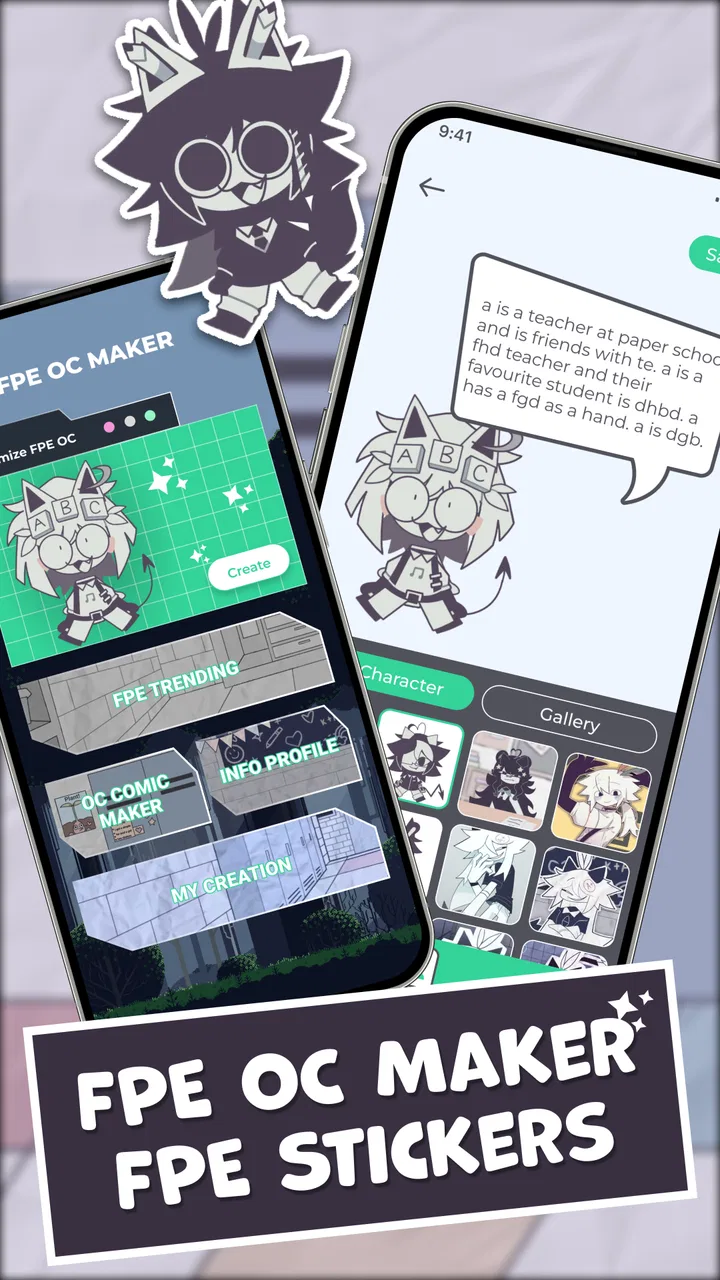
FPE OC Maker: FPE Stickers
- 3.6
- Rating
- 1.00M
- Installs
- Free
- Price
 Analysis by App-foxy
I opened FPE OC Maker: FPE Stickers looking for a quick way to turn a character idea into a paper-style cartoon design. That is exactly the kind of job this free art and design app is aimed at: starting with a rough original-character concept, shaping it visually, and ending with something that feels ready to share as a sticker or reference image. My first impression was that it is much more approachable than a full drawing program, especially when I want a result quickly rather than a blank canvas with dozens of tools.
The app comes from Revivoskin and has attracted over a million installs, which makes sense once you understand its appeal. It focuses on a narrow creative task instead of trying to replace a complete illustration suite. The audience rating is Everyone, and the app runs on Android 7.0 or later. I would describe it as a character-building utility for people who enjoy FPE-style designs, not as a general-purpose editor for painting, animation, or professional graphic work.
From a rough idea to a finished character
I find that the most useful starting point is a short character brief rather than browsing choices without a plan. Deciding on a mood, a defining visual trait, and where the finished design will be used gives each adjustment a purpose and makes it easier to stop when the character feels coherent. From there, the next question is how to keep the build process quick without letting experimentation become a time sink.
You May Also Like

 Blood Strike: 2.5 Anniversary
Blood Strike’s Loadouts Turn Every Drop Into a Tactical Gamble
A close look at Blood Strike’s custom loadouts: how fast access to signature weapons reshapes its battle royale rhythm, rewards preparation, and narrows the gap between fights.

 Pandora - Music & Podcasts
Pandora’s Music Is Easy to Start, but Harder to Recover
Pandora’s strength is its low-effort path from a seed to a station. Its weak spot is how much confidence it asks you to place in connection, setup, and quiet recovery.

 8 Ball Pool
 Is Built on Rivalries, Rematches, and Routine
A close look at the rivalries, rematches, shared routines, and unanswered safety questions that turn a quick pool match into a persistent mobile community.

 Samsung Music
’s Quiet Strength Is Playing What You Already Own
Its reach comes less from spectacle than from dependable access to a personal library. That simplicity is both the app’s strongest retention engine and its ceiling.

 AccuWeather: Weather Radar
AccuWeather Review: A Quick, Clear Forecast for Everyday Decisions
For everyday plans, the best forecast is the one you can understand quickly. AccuWeather makes rain timing, radar, and local conditions easy to act on, with a few trade-offs.

 Hill Climb Racing
Why Hill Climb Racing Still Turns Crashes Into One More Run
A tiny car, a bumpy hill and one more upgrade: Hill Climb Racing keeps resurfacing because its simple chaos makes every near-miss feel personal.
More From Our News Desk



Starting with the character brief
The easiest way to use the app is to begin with a small, specific idea. I would not start by trying to design an entire cast at once. A better approach is to decide on a few visible traits first: the character’s general mood, hairstyle, clothing direction, and the kind of sticker expression that should represent them. That preparation matters because a creator with no plan can spend more time browsing choices than actually making a character.
For example, imagine I want a quiet student character with a slightly nervous expression, a simple school outfit, and a sticker-like pose that can work in a chat. I can keep that brief in mind while building instead of selecting every option randomly. This is one of the app’s useful strengths: it lowers the barrier between an idea in my head and a recognizable visual draft, even when I am not confident at drawing.
The paper-cartoon direction also gives the result a clear identity. It is not trying to imitate a realistic portrait, and that limitation is helpful. I can concentrate on silhouette, face, hair, clothing, and expression rather than worrying about shading, anatomy, or a detailed background. The best results come from treating the app as a focused character workshop, not a miniature version of a professional art studio.
Building the visual base
Once I begin assembling the character, I pay attention to the order in which each visual choice changes the overall impression. The face and hair establish recognition first. Clothing then supports the character’s role, while the expression determines whether the final image feels friendly, dramatic, embarrassed, or playful. If I change too many elements without checking the whole figure, the design can lose its original personality.
A practical trick is to make one intentionally simple version before experimenting. I might choose a plain hairstyle and outfit, check whether the face already communicates the character, and only then add more distinctive details. This creates a useful baseline. If a later version looks cluttered, I know which changes caused the problem rather than having to rebuild the character from memory.
I also recommend designing for the final use from the beginning. A character intended as a sticker needs to remain readable at a small size. Tiny distinctions that look interesting while editing may disappear when the image is viewed in a messaging app. Strong contrast between the face, hair, and clothing usually matters more than adding every available decorative choice. That is an easy detail to overlook when the editor encourages experimentation.
Making expressions serve a purpose
The sticker angle becomes more useful when I think in terms of communication rather than decoration. Instead of making one attractive portrait, I can create a small set of characters or expressions for different situations: greeting a friend, reacting with surprise, showing annoyance, or celebrating a good result. Even if I only need one image today, planning several related moods helps keep the character consistent.
This is also where the app is more practical than drawing from scratch for casual users. A hand-drawn sticker can have more personality, but it takes time and confidence. Here, I can focus on choosing a clear emotional direction. The trade-off is that the final character may feel closer to the app’s visual language than to a completely personal drawing style. For a quick fan-inspired concept or profile image, that consistency is often a benefit; for a distinctive portfolio piece, it may feel restrictive.
Keeping a repeatable workflow
When I create more than one design, I use the first character as a visual reference rather than starting with a completely different approach. I keep the broad proportions and recognizable traits in mind, then vary the expression or outfit. This makes a group feel connected. It is especially useful for an original-character project where the goal is to build a cast, not just produce isolated pictures.
Another useful habit is to pause before finishing and ask three simple questions: can I identify the character quickly, does the expression match the intended message, and would the image still make sense without an explanation? If the answer to any of these is no, I simplify before adding more. The app makes experimentation easy, but it does not automatically make a crowded design readable.
Moving the result outside the editor
The real handoff happens when the finished creation leaves the app. I might use it as a reference for a drawing, share it with friends, or place it alongside other character concepts. That means I should judge the design as an exported or shared image, not only as something that looks good while I am editing it. A sticker that communicates clearly in a conversation has succeeded even if it is not detailed enough for a poster.
For a personal project, I would keep a simple naming system for the characters and expressions outside the editor. Names such as “student nervous” or “character surprised” are more useful later than a vague label. This is not an advanced app feature; it is a workflow improvement that prevents confusion when several similar designs accumulate. The more I use the creator for a cast, the more important that small organizational step becomes.
What the handoff feels like in everyday use
A realistic scenario would be making a reaction sticker before chatting with friends. I start with a character I already imagine, build a recognizable face and outfit, adjust the expression to match the message, and then share the finished visual. The process is quicker than opening a full illustration app, creating layers, sketching a pose, cleaning the lines, and preparing a final image. That speed is the main reason I would recommend trying it.
There is also a useful handoff between the app and a larger creative project. I can use the character creator to settle on a design before drawing the same character in another program. In that role, the app works like a visual planning tool. It helps answer basic questions about the character’s appearance before I invest time in detailed artwork. This is a stronger use case than expecting it to handle every stage of a polished illustration.
Where the workflow starts to break
The focused design can become a limitation when I want control beyond the available character-building approach. Someone looking for freehand brushwork, custom anatomy, detailed lighting, complex backgrounds, or precise layer editing will probably outgrow it quickly. A conventional drawing app is the better choice for those tasks because it gives the artist direct control over the image rather than guiding the result through a simplified creator.
I also would not choose it for a project that depends on a highly individual visual identity. The paper-cartoon style is the point, but it also means the finished work belongs to a recognizable format. That may be perfect for casual stickers and character concepts, while an illustrator preparing original assets for a serious portfolio may prefer a blank canvas and their own tools from the start.
Another point of friction is decision overload. A simple creator sounds effortless, but a large collection of visual choices can still make the process feel repetitive if I do not have a clear goal. The solution is to work from a brief, create a basic version first, and make changes one category at a time. Without that discipline, I can end up with a character that contains interesting parts but has no coherent personality.
How it compares with the usual alternatives
Compared with a full mobile drawing app, this creator is easier to approach and faster for a finished cartoon concept. I do not need to understand brushes, layers, line control, or color workflows before producing something recognizable. The cost of that convenience is flexibility. A drawing app is better when I need an unusual pose, a custom background, or a style that does not fit the paper-character format.
Compared with a generic avatar maker, the stronger point here is the FPE-oriented sticker identity. A general avatar tool may be more suitable for a profile portrait or a broad range of looks, while this app makes more sense when I specifically want a paper-style cartoon character and expressive sticker result. The choice depends less on which tool is “best” and more on whether that visual direction matches the project.
Compared with drawing stickers manually, the app wins on speed and accessibility. Manual drawing wins on uniqueness and control. I would use the creator for quick ideas, casual sharing, and early character planning, then move to a drawing app if the concept deserves detailed refinement. That two-step workflow avoids forcing one tool to do a job it was never meant to handle.
Who will enjoy it most
I think it is a good fit for fans of FPE-style character art, casual creators, younger users, and anyone who wants to make a character without learning a complete illustration package. It is also useful for writers and role-players who need a visual reference for an original character. The Everyone content rating makes it approachable for a broad audience, although the creative expectations should remain realistic: it is a simplified maker, not a professional production environment.
People who should skip it are those who already know they need detailed drawing controls or a completely custom visual style. If the goal is a polished comic panel, layered concept art, or a carefully painted illustration, starting in a full art app will save time in the long run. The same is true for users who want extensive editing after the character is assembled. This tool is most valuable before that stage, when the main problem is deciding what the character should look like.
Performance expectations and version context
The current version is 1.1.5, and the Android requirement reaches back to version 7.0, so it is accessible on a wide range of devices that are not running the newest software. That is useful for families or casual users with older phones. I would still keep expectations sensible on a smaller screen: character creation is easier when I can see the whole design clearly, and repeated adjustments may feel cramped on compact displays.
The app is free to use, which removes the biggest obstacle for someone who only wants to test the workflow. Its average rating is 3.4 from more than six hundred ratings, with forty-two written reviews, so the public response is mixed rather than universally enthusiastic. I read that as a reason to approach it for its specific purpose. It can be worthwhile when the paper-style creator matches what I need, but it should not be judged as a replacement for every art tool on a phone.
My practical verdict after using the workflow
What I like most is the short path from a vague character idea to a shareable visual. The app gives me a starting structure, encourages expressive designs, and makes the first draft less intimidating than a blank canvas. The most effective workflow is deliberate: define the character, build a simple base, test the expression at a small size, make only purposeful changes, and then use the result as a sticker or reference.
What holds it back is the same focus that makes it approachable. I cannot expect the freedom of a dedicated drawing program or the individuality of a hand-illustrated sticker. Some projects will reach the app’s limits quickly, especially when they require custom poses, detailed scenes, or precise finishing work. Knowing that before starting prevents disappointment and helps me use it as part of a wider creative process.
Overall, I would recommend FPE OC Maker: FPE Stickers to a friend who wants fast FPE-style character concepts, simple sticker ideas, or a low-pressure way to visualize an original character. I would not recommend it as the only art app for serious illustration. Its value is in the handoff: it turns an idea into a readable first result, and that result can then guide sharing, storytelling, or more detailed work elsewhere.
FAQs for FPE OC Maker: FPE Stickers
01What is FPE OC Maker: FPE Stickers and what can I do with it?
FPE OC Maker: FPE Stickers is a creative application designed for users to craft and customize their unique original characters (OCs) using a variety of stickers and design tools. This app allows you to experiment with different styles, colors, and accessories to bring your imagination to life and share your creations with friends or on social media.
02Is FPE OC Maker: FPE Stickers free to use?
The app is free to download and provides access to a basic set of features. However, to unlock additional premium stickers, customization tools, and features, in-app purchases may be required. This allows users to enhance their creative experience and access exclusive content for more detailed designs.
03What platforms is FPE OC Maker: FPE Stickers available on?
FPE OC Maker: FPE Stickers is available for both Android and iOS platforms. You can download it from the Google Play Store or the Apple App Store, ensuring compatibility with a wide range of smartphones and tablets for easy access and use on your preferred device.
04Can I share my creations with others?
Yes, FPE OC Maker: FPE Stickers allows you to easily share your creations directly from the app. You can export your designs to your device’s gallery and share them via social media platforms, messaging apps, or email. This feature encourages users to showcase their creative expressions with friends and the online community.
05Are there any age restrictions for using FPE OC Maker: FPE Stickers?
FPE OC Maker: FPE Stickers is designed to be user-friendly and suitable for all ages. However, parental guidance is suggested for younger users, especially when accessing in-app purchases or sharing creations online. The app aims to provide a safe and creative environment for users of various age groups.
Pros
- Easy-to-use interface for quick customization.
- Wide range of stickers and emojis available.
- Regular updates with new features and content.
- Supports high-resolution outputs for quality images.
- Compatible with both Android and iOS platforms.
Cons
- Limited free features; many require in-app purchases.
- Occasional lag on older devices.
- Ads can be intrusive during use.
- No offline mode; requires internet connection.
- Limited support for exporting to non-standard formats.

FPE OC Maker: FPE Stickers
Gallery